Showing posts with label Arts. Show all posts

Tuesday, 11 October 2011

Audio - Three Free Songs! Thunderhead Debut


Audio here,

First of all, I need to thank every one of you guys for the warm welcome back. We have been getting more feedback, and more traffic than ever. And it's all thanks to you. :)

All right, gushing aside, I have some awesome stuff to offer to you fine readers. Now, think way way back to when i said i was setting up new production software, and would have new Drum and Bass soon? Well, eventually, I deliver. This is Thunderhead Drum and Bass.

I have here, my FREE three track EP, "Frozen Dreams":
http://www.mediafire.com/?k3pvc95ty4caz8t
Or each individually, on my Soundcloud page:
http://soundcloud.com/thunderheadDNB


So i thought i might give a quick run-down of the tracks. (If you want me to actually de-construct them, drop us a comment or e-mail, and if enough people want it I'll do a tutorial sort of post.)

Track 1: Humility (Intro)

This song was rather spontaneous, I wrote it the morning i was going to release the other two tracks. It was a chilly autumn morning, and I was  feeling simple, melancholy, and cold. To add to the vibe of "Frozen Dreams", I composed this atmospheric, minimalistic piece of music. Relaxing chords, and interesting percussion; in this way I sought to 'refresh the mind' of the listener, and go into the rest of the EP with an open mind.

Track 2: Frozen Dreams

The title track of the EP, Frozen Dreams is what really steered the direction of the EP. Before this tune I wasn't quite sure where I was going to take the Thunderhead project. I tried a few neurofunk, dubstep, liquid, jungle, and soundtrack tunes, before finally getting on a roll when I downloaded the London Elektricity sample pack, and started crafting Frozen Dreams. Ironically enough, there are very few samples from that pack in the song Frozen Dreams, but it still felt as if it was the catalyst.

Track 3: Sun Dog

This ended up being my favourite song of the EP, so it felt only natural to place it at the end. I love liquid drum and bass. Period. This song feels like a song I would have listened to two years ago and would smile and dance, and wish to be making music like this. 'Nuff said. Killer tune.

In addition to all of this, Sun Dog was recently featured on Weekend Confirmed Podcast: Episode #81, and met with high praise and regard. I couldn't be more happy, this is my favourite video game podcast, and have been listening for years. If anyone is interested in using or featuring these tracks anywhere, just drop an email to me at audiovisua@gmail.com, and i would be happy to talk to you.

Go ahead and pick up the podcast, if you like Video Games and Thunderhead DNB
Weekend Confirmed #81


In the near future, you can expect 30 minute DJ mixes from myself, Thunderhead, available for free download, right here on AudioVisua Productions. And as always, drop a comment, and email, whatever you like. I'm super stoked to be releasing this EP, and I would love it if you all picked it up. Come on, the thing is free.

Cheers,
             Audio

Wednesday, 5 October 2011

Audio & Visua - We're Back!

Audio and Visua here,

It's been a while. We know that, you know that. Firstly we would like to apologize for the extended absence, Visua had a rough time managing the blog solo while I (Audio) was in china, and ever since I returned there was a bit of a downwards spiral of business, and it resulted in the informal closure of the blog.

This does not mean we weren't busy. Visua created and finished a short film while I was away which was recently screen in the Edmonton International Film Festival (EIFF), and has just been accepted into the Michigan Film Festival. As for myself, I created a new DnB alias (Thunderhead) for my Liquid DnB projects using Logic 9, (yes, i finally sorted that whole thing out) and have already completed a three-track EP under this name.

We also thought it courteous to re-launch the blogs design, to start fresh in all sorts of ways.


So in the next little while, you can expect:
                                                                   
                                                                                - Free downloads off my new EP, "Frozen Dreams"
                                                                                - News concerning Visua's short film
                                                                                - Free 30 min DJ mixes from Audio 
                                                                                - More film and music reveiws
                                                                                - Off-topic columns
                                                                                - News on our upcoming projects.


We appreciate all of your kindness and courtesy over these events.

Cheers,
             AudioVisua

Tuesday, 12 April 2011

Audio: How To Go From Basement Tinkerer To Serious Producer In 5 Steps

Audio here,
                   So I'm writing this entry because i recently went through this same transition. I had been having a lot of fun producing songs with free programs, and they were turning out decent, but at some point, you start to wonder if you can make your own stuff sound like what you hear from your favourite DJs and producers. For the purposes of this guide, I am assuming you have already spent a year or so making your own tracks, but you want to upgrade to a more professional set-up. I can show you how to do just this in 5 easy steps.


Step 1: Upgrade Your Software
I realize this may seem obvious, but it is true, no professional DJ or producer uses Garageband to make their original tracks. When i was trying to take this jump for myself, I had a really tough time understanding which program to get. The reason for this is that there are A LOT of audio engineering programs out there, and honestly, it's confusing. Maybe another time I'll give you guys a run-down of different programs, but this guide I'm going to tell you about Logic 9. Logic 9 is the latest version of the popular Apple software, and this program is the real deal. I've heard pros in the Dubstep, Trance, and Drum and Bass world all say that they have used some form of Logic Studio at some point in their career. If you're at all familiar with Garageband, this program will come as a breeze for you. If you're not, don't worry, as Apple supplies many tutorials, and youtube is full of similar resources. But assuming you've seen your way through a few tracks, Logic 9 should be a good step forward. Seeing how this is professional software, it does not come cheap. The price for the full version of Logic 9 now runs for $500. If you can't afford this, I've heard there might be ways to possibly download this program from certain... Less than honourable websites. (Nudge nudge wink wink)
Step 2: Get Some Studio Monitors
If your gonna be a profession producer now, your gonna need to hear your music in a wide variety of ways. This will include through your laptop speakers, through your headphones, through your DJ rig, and most importantly, through a pair of professional studio monitors. These are simply really nice speakers that you are going to put up in your studio so you can hear every detail of the sounds you're making. Like software, good audio equipment isn't cheap. But believe me, this isn't a step you want to skimp out on. These monitors are an investment, and you will appreciate them for much more than just their professional applications. Of course, when buying any sort of amplification, there are going to be powered and passive models. I'm going to assume you know the difference, and if not, you may want to refer to my article on DJ gear. For this guide, I'm going to show you a pair of powered monitors that will cost about $200 each. This is actually a fairly reasonable price, that will give you studio-quality listening.
Step 3: Look Into a MIDI Keyboard
This step isn't absolutely necessary, although it will help greatly when making your tracks. A MIDI keyboard is basically a small piano keyboard that plugs into your computer, that you can play on while making your songs. This means you can record directly from it, and program it with any sound under the sun, including synths and textures you have made for yourself. Not everyone feels they need this, as all these functions can be duplicated on your computer itself, but if you want a solid professional setup, this is a great option. MIDI keyboards run in a large range of prices, but for this guide, you can pick up an introductory model for only $100. If you find you would like, and need, a more upscale model, these can run anywhere into a few thousand dollars.


Step 4: Buy An Analog Synth Or Two
In truth, these work very similarly to a MIDI keyboard and some audio software. Really, an analog synth is just a program dedicated to making certain sounds. This is almost like you took the 'virtual instruments' section out of Garageband and made it amazing. You can shop around for these, but one that was recommended to me by various sources, including the producer behind the E-Z Rollers, is the Native Instruments - Massive synth. This program isn't cheap, but many world-class producers have used this in engineering some of their best audio. you can pick this little program up for $200.
Step 5: Make Production A Priority
This one may not cost any money, but it's one of the hardest steps for many people. If you want a serious shot at becoming a professional producer, you're going to have to drop your other hobbies, stop caring so much about your girlfriend/boyfriend, and spend every free moment you have either in your studio making beats and synths, or listening to your heroes, and analyzing every single technique they use. No one said it would be easy, but this is what it takes to make the jump from average joe to legit producer.


So there you have it, a nice little laundry list of the things you should be doing to turn into a respected producer. Of course, everyone comes about this process different ways, and this guide is just here to point you in the right direction. No one said this would be cheap, but if you have $1200 to drop on your passion, this might just be a guide you can use. As always, if you have any more questions about this process, or anything else audio-related, you can drop a comment on this post, or email me at audiovisua@gmail.com,with the subject line "Audio: your topic here", and I'll make an effort to get back to you soon. Writing this entry has inspired me, and hopefully once my studio is up and running again, I'll have a new track coming for you guys soon.


Easy, 
         Audio

Monday, 11 April 2011

Audio: What Do I Need To Start DJ-ing?

Audio here,
                    So i have heard this question from a lot of people, (i remember asking it myself at one point) as a lot of kids want to start mixing their own tunes, or just get into the hobby. For the purpose of this particular article, I will just talk about the pieces of hardware you need. Maybe in a later entry I could talk about technique, or how to promote yourself etc.

You Only Need 5 Things To Start:

1: A Mixer
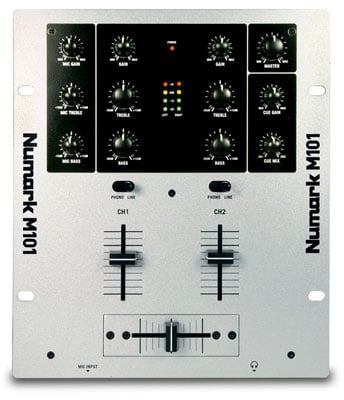
                   Ok, so this is the first one, and also a big one. You Need at least a two channel mixer with a crossfader. This just means the mixer can handle two inputs. This could be a turntable, cd deck, mp3 player, laptop, you name it. The crossfader is simply for panning between your two channels at will. This is how DJs get a continuous mix going throughout the night, by constantly having one track ready to go. These mixers come in a wide range of prices, that can easily run you thousands, for a pro model. But here's a link to a decent beginner mixer, with two channels and a crossfader for only $80. These are easy to upgrade, as all you need to do is unplug your old one and strap on your new one.

2: Turntables Or CD Decks
                                              Ok, so here's where things get a little more complicated, and a little more pricey. You need your decks so you can play your music. In theory you could just have your iPod and a CD player hooked up to your mixer, but that doesn't allow you have the same quality or functionality of decks. The purpose of decks is that you can find specific passages of songs quickly, through analog means. (Literally picking up the needle and dropping it on that sick break you wanted to add) When looking for a good turntable, the number one thing you want is for it to be direct drive. This is opposed to the cheaper alternative of belt drive. Belt drive means that there is a little gear inside the turntable attached to a belt that spins the plate which spins your record. There's a lot of moving parts in this design, which generally leads to more breaking, and a more uneven sound. A direct drive has the plate directly attached to the motor, which is more reliable and has a more even sound. I understand how many newbies might not care, so i scoped a cheap introductory turntable for about $150.
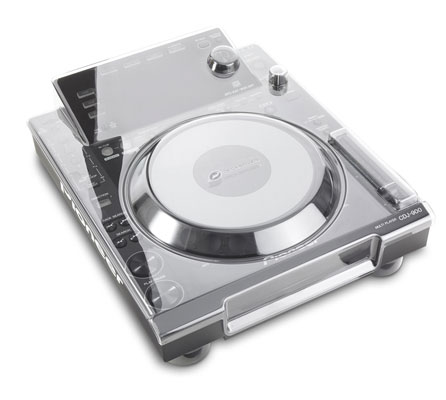
Alternatively, you can purchase CD decks, which works similarly to a turntable, and in fact, are actually modeled to look and feel like a turntable. These come pretty cheap, but like anything, the fancy ones can run you a lot of cash. Here's a reasonable one for about $65.


3: Speakers
                    Just like playing an instrument, you can do it without an amp, but no one will hear you. DJing is no different. I don't think i really need to explain to anyone how speakers work, but you're gonna plug them into your rig and make it sound real nice. Speakers come in a huge range of prices, especially when you factor in possibly buying additional components, like a subwoofer or tweeter. The one thing you have to look out for is Powered vs Passive speakers. A powered speaker has it's own "brain" inside it, it's good to go out of the box. But if you buy a passive speaker, it's just a speaker with nothing else. You will need a powered mixer or powered pre-amp to make something like this run. But still, you can pick up an introductory set for about  $70 a pop.


4: Headphones
                          This one may seem obvious, but you need a really good pair of studio-quality headphones. No more earbuds for you. You need noise-isolating headphones so you can cue up your different tracks without getting distracted by the crowd, our your other tracks. These are pretty easy to come across these days, as the style is now to walk around with big chunky headphones. Regardless, you can get some solid studio-quality headphones for about $60. This is a pretty decent brand, also makes good microphones.

 The only other thing you may need, depending on your set-up, is a 3.5mm to 1/4" adapter. This takes a regular headphone output and converts it into a 1/4" output, one you will see often on more sophisticated DJ gear. The price is no problem, you can pick one up for only $2.


5: Music
               You need music. Plenty of music. ALL KINDS of music. This means CD's vinyl records, mp3s, mp4s, tape cassettes, you name it. You're gonna be a DJ now, and this means understanding music past the surface level. Learn how different an mp3 sounds to a vinyl record of the exact same song. Learn why we don't use tape cassettes anymore. Once you have a large library, then you can hope to satisfy the demands of clubs, parties, and weddings.


Well, that should be about everything. This is only the gear you need, the skills will come after many nights spent in your basement scratching the decks and watching youtube videos. I hope this helps some people out, and puts DJing in the realm of possibility for some people, especially seeing it may only cost you as little as $427. This is if you buy your gear piece by piece, I do know of all-in-one DJ packages you can buy for as little as $265. But I promise, you will love a set you made yourself much more, and it will be of better quality that these "DJs in a box". Plus, most of these do not come with speakers of any kind.


Well, that about does it for me, be sure to message, comment, or e-mail us if you have any questions or comments. I hope you enjoyed reading this feature as much as I enjoyed writing it.

Easy,
         Audio


Saturday, 9 April 2011

Introductory Post: Visua

Hello Everybody,

This is Visua from AudioVisua Productions and I'm pleased to introduce our new blog where we will cover just about everything that pertains to the audio and visual fields of art.

I specialize in the "visual" aspect in just about any technical art, therefore readers will be immersed in many movie reviews, movie discussions, technical knowledge (i.e. lighting, editing, visual fx, equipment, etc.). Every now and then we will have special posts that may be video game reviews, camera reviews, tutorials, hot topics, short film specials, film festival information, stage production reviews, music videos, retrospectives, and much more, you name it.

For all those young independent filmmakers out there, we would be delighted to feature and spotlight your videos for you! We actually are featuring several youtube channels at the moment, one of them being "DarthXboxian", an ambitious young filmmaker who puts a lot of work into his passion. We will give links and review his videos regularly because we love to help those who deserve some recognition. We are happy feature your channels!

Even though we are just starting out, we are already developing partnerships with wonderful websites, blogs, and channels that share information in the great fields of Audio & Visual arts.

Contact us at audiovisua@gmail.com! Put "Visua: enter topic here" as the subject of your email if you have a question you need help answering, a submission (for a video, channel, website, etc.), requests, or any other reason related to the Visual aspect of our blog. The same goes for the Audio section of our blog, so in that case it would be "Audio: enter topic here" as the subject of your email!

Thanks and we hope you tune regularly as we promise to keep you updated for all you audio & visual needs!


-Visua, AudioVisua Productions