Audio here,
So i have heard this question from a lot of people, (i remember asking it myself at one point) as a lot of kids want to start mixing their own tunes, or just get into the hobby. For the purpose of this particular article, I will just talk about the pieces of hardware you need. Maybe in a later entry I could talk about technique, or how to promote yourself etc.
You Only Need 5 Things To Start:
1: A Mixer
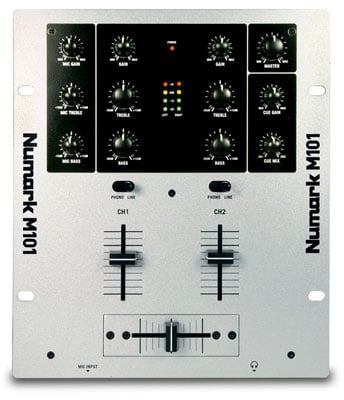
Ok, so this is the first one, and also a big one. You Need at least a two channel mixer with a crossfader. This just means the mixer can handle two inputs. This could be a turntable, cd deck, mp3 player, laptop, you name it. The crossfader is simply for panning between your two channels at will. This is how DJs get a continuous mix going throughout the night, by constantly having one track ready to go. These mixers come in a wide range of prices, that can easily run you thousands, for a pro model. But here's a link to a decent beginner mixer, with two channels and a crossfader for only $80. These are easy to upgrade, as all you need to do is unplug your old one and strap on your new one.
2: Turntables Or CD Decks
Ok, so here's where things get a little more complicated, and a little more pricey. You need your decks so you can play your music. In theory you could just have your iPod and a CD player hooked up to your mixer, but that doesn't allow you have the same quality or functionality of decks. The purpose of decks is that you can find specific passages of songs quickly, through analog means. (Literally picking up the needle and dropping it on that sick break you wanted to add) When looking for a good turntable, the number one thing you want is for it to be direct drive. This is opposed to the cheaper alternative of belt drive. Belt drive means that there is a little gear inside the turntable attached to a belt that spins the plate which spins your record. There's a lot of moving parts in this design, which generally leads to more breaking, and a more uneven sound. A direct drive has the plate directly attached to the motor, which is more reliable and has a more even sound. I understand how many newbies might not care, so i scoped a cheap introductory turntable for about $150.
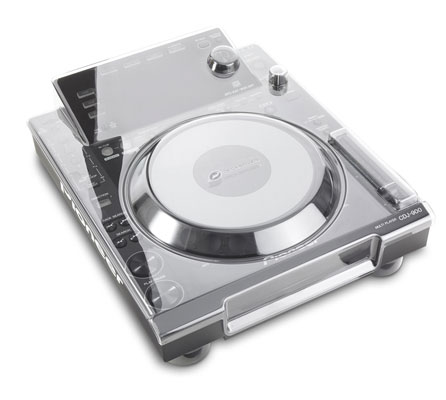
Alternatively, you can purchase CD decks, which works similarly to a turntable, and in fact, are actually modeled to look and feel like a turntable. These come pretty cheap, but like anything, the fancy ones can run you a lot of cash. Here's a reasonable one for about $65.
3: Speakers
Just like playing an instrument, you can do it without an amp, but no one will hear you. DJing is no different. I don't think i really need to explain to anyone how speakers work, but you're gonna plug them into your rig and make it sound real nice. Speakers come in a huge range of prices, especially when you factor in possibly buying additional components, like a subwoofer or tweeter. The one thing you have to look out for is Powered vs Passive speakers. A powered speaker has it's own "brain" inside it, it's good to go out of the box. But if you buy a passive speaker, it's just a speaker with nothing else. You will need a powered mixer or powered pre-amp to make something like this run. But still, you can pick up an introductory set for about $70 a pop.
4: Headphones
This one may seem obvious, but you need a really good pair of studio-quality headphones. No more earbuds for you. You need noise-isolating headphones so you can cue up your different tracks without getting distracted by the crowd, our your other tracks. These are pretty easy to come across these days, as the style is now to walk around with big chunky headphones. Regardless, you can get some solid studio-quality headphones for about $60. This is a pretty decent brand, also makes good microphones.
The only other thing you may need, depending on your set-up, is a 3.5mm to 1/4" adapter. This takes a regular headphone output and converts it into a 1/4" output, one you will see often on more sophisticated DJ gear. The price is no problem, you can pick one up for only $2.
5: Music
You need music. Plenty of music. ALL KINDS of music. This means CD's vinyl records, mp3s, mp4s, tape cassettes, you name it. You're gonna be a DJ now, and this means understanding music past the surface level. Learn how different an mp3 sounds to a vinyl record of the exact same song. Learn why we don't use tape cassettes anymore. Once you have a large library, then you can hope to satisfy the demands of clubs, parties, and weddings.
Well, that should be about everything. This is only the gear you need, the skills will come after many nights spent in your basement scratching the decks and watching youtube videos. I hope this helps some people out, and puts DJing in the realm of possibility for some people, especially seeing it may only cost you as little as $427. This is if you buy your gear piece by piece, I do know of all-in-one DJ packages you can buy for as little as $265. But I promise, you will love a set you made yourself much more, and it will be of better quality that these "DJs in a box". Plus, most of these do not come with speakers of any kind.
Well, that about does it for me, be sure to message, comment, or e-mail us if you have any questions or comments. I hope you enjoyed reading this feature as much as I enjoyed writing it.
Easy,
Audio
Showing posts with label Cost efficient. Show all posts
Monday, 11 April 2011
Audio: What Do I Need To Start DJ-ing?
Labels:
Amateur,
Arts,
Audio,
Cost efficient,
DJ,
DJ Equipment,
Drum and bass,
Dubstep,
Easy way,
Gear,
Help,
Information,
Music,
Professional,
Ratings,
Reviews
Sunday, 10 April 2011
Visua: Tips For Starters - What Camera Should I Buy?
(for any questions email us at audiovisua@gmail.com! If you wish to speak with a Video expert title your subject with Visua:_______, if its for Audio you want then title it with Audio:_____)
Hey Visua here,
Many young filmmakers out there who don't have that big of a budget always struggle with what camera they should buy to produce their next work of art as they aspire to their passion of film-making. You want a new camera but you don't know which one to get!
First ask yourself two questions, "How much am I willing to spend?" and "What type of camera do I want?"
The amount you are willing to spend is a very important thing to know before you go out an shop. Let's start with the lowest prices. You can always go with the $200-$300 digital camcorders who MIGHT have HD, but if you have more money to spend, might as well get the best you can. The next step up are the HD digital camcorders around $400-$900 bucks. The Canon Vixia (Legria in Europe) series has been promising to me, with moderate quality HD and easy-to-use interface. Shooting in 24 and 30 fps has always been fun.
The best camcorder to get that gives you the best quality for the best price is the Canon HV40. Now this is an HDV camcorder so you will be using mini-DV tapes (or firewire to connect to your computer), BUT this gives you incredibly good quality for a price of about $400-$600 bucks!
Next up is the dslr cameras that will take you at a higher price but a much better quality of HD digital video. The Canon T2i rebel is an affordable dslr camera with surprisingly good video which will bee around $600-$800 bucks for the body. The Canon 60D and 7D are the leading slr's that people buy for unbelievably crisp HD video, there have been multiple short films that made it to Sundance filmed on the 60D and 7D's. Now which one, the 60D or the 7D? Now there is a $600 price difference (60D body = $1000, 7D body = $1600), because the 7D has much better photograph features and is more durable, but the video is virtually exactly the same, so it all depends on what you want it for.
***NOTE: A lot of money will be spent on SLR's because it really the lenses that give you picture you want and they can get expensive, so budget properly!
So the main types of cameras that young filmmakers should look at are digital camcorders, HDV camcorders, and Dslr's. Find which price range is best for you and browse the models and see what features you want. The cameras I listed above will do the trick for you if you use them properly!
I have one big piece of advice that someone very skilled once told me: It's not about the camera you have, its about your storytelling. So aim for the right camera for you but don't hinge your talent on the visual quality of your videos, otherwise you'll lose touch why you are making them in the first place. Focus on story telling!
Happy Filming!
-Visua, AudioVisua Productions
Here are some videos filmed with the Canon Vixia HFS 10 (HD digital camcorder)!
Courtesy of DarthXboxian.
Hey Visua here,
Many young filmmakers out there who don't have that big of a budget always struggle with what camera they should buy to produce their next work of art as they aspire to their passion of film-making. You want a new camera but you don't know which one to get!
First ask yourself two questions, "How much am I willing to spend?" and "What type of camera do I want?"
The amount you are willing to spend is a very important thing to know before you go out an shop. Let's start with the lowest prices. You can always go with the $200-$300 digital camcorders who MIGHT have HD, but if you have more money to spend, might as well get the best you can. The next step up are the HD digital camcorders around $400-$900 bucks. The Canon Vixia (Legria in Europe) series has been promising to me, with moderate quality HD and easy-to-use interface. Shooting in 24 and 30 fps has always been fun.
The best camcorder to get that gives you the best quality for the best price is the Canon HV40. Now this is an HDV camcorder so you will be using mini-DV tapes (or firewire to connect to your computer), BUT this gives you incredibly good quality for a price of about $400-$600 bucks!
Next up is the dslr cameras that will take you at a higher price but a much better quality of HD digital video. The Canon T2i rebel is an affordable dslr camera with surprisingly good video which will bee around $600-$800 bucks for the body. The Canon 60D and 7D are the leading slr's that people buy for unbelievably crisp HD video, there have been multiple short films that made it to Sundance filmed on the 60D and 7D's. Now which one, the 60D or the 7D? Now there is a $600 price difference (60D body = $1000, 7D body = $1600), because the 7D has much better photograph features and is more durable, but the video is virtually exactly the same, so it all depends on what you want it for.
***NOTE: A lot of money will be spent on SLR's because it really the lenses that give you picture you want and they can get expensive, so budget properly!
So the main types of cameras that young filmmakers should look at are digital camcorders, HDV camcorders, and Dslr's. Find which price range is best for you and browse the models and see what features you want. The cameras I listed above will do the trick for you if you use them properly!
I have one big piece of advice that someone very skilled once told me: It's not about the camera you have, its about your storytelling. So aim for the right camera for you but don't hinge your talent on the visual quality of your videos, otherwise you'll lose touch why you are making them in the first place. Focus on story telling!
Happy Filming!
-Visua, AudioVisua Productions
Here are some videos filmed with the Canon Vixia HFS 10 (HD digital camcorder)!
Courtesy of DarthXboxian.
Labels:
"Film Look",
Amateur,
Cameras,
Canon 60D,
Canon 7D,
Canon HV30,
Canon HV40,
Canon Vixia HFS,
Cost efficient,
DSLR,
Filmmaking,
HD video,
Low Cost,
Movies,
Short Films,
Which Camera,
Yound film
Visua: The Film Look
Hey guys,
I know a lot of amateurs out there struggle with finding the 'film look' that we see and love in all our favorite hollywood films. How can someone with no budget and no big equipment achieve this look? This post will let you explore many cost-efficient and simple ways to get the "film look" as we explore shots, lighting, programs and colour grading. Also you will find some basics good for starters here.
The first thing I want to say is that it really doesn't matter what type of camera you have! It really doesn't! Although it is nice to have HD camcorders or dslr's and of course good old HDV cameras. One of the most important things one can do to get even close to getting the 'film look' is how he sets up his shots! Follow the guidelines for mid-shots, close ups, wide shots, extreme wide shots, two shots. Look at this link for examples of these: http://www.mediacollege.com/video/shots/.
Next up you want to make sure what your shooting in the frame is well lit! If the original lighting is bad (too dark is worst case scenario), then there is no way you are going to get close to the film look. Here is a quick education of types of lighting: http://www.cybercollege.com/tvp027.htm
Now that you have filmed your shots in the best way you could have, but its still not cinematic enough for you, here comes the magic of post-production to fix that! Many ask what programs they should get. I personally love to use Final Cut Pro but that isn't available to everyone. If you have a mac iMovie has some beginner colour settings (which i wouldn't recommend if you have a better program), here you want to mess with the brightness by making is slighter darker, same with the exposure and the colour level bars (so you can get a small black vignette). Sony Vegas will have coulour correcting settings which you mess around with, and also (very important!) look at their widescreen settings so you can get the famous panoramic black bars to accompany your colour-graded look. No matter what program you use, you always want to make the footage a tad darker, and add some colour to it (green, yellow) and never saturate too much. If there are widescreen settings, I suggest you fiddle around with that to your liking.
The trick to colour grading is to mix about two or 3 coulours. If you want that yellowish film look (like seen in the social network) I would only use yellow, green and some darkening.
If you want to achieve whatever film look that you've seen in a movie but you just can't get it right, email us at audiovisua@gmail.com and begin the title of your subject with "Visua: enter subject here"
Hope this helps you guys!
-Visua, AudioVisua Productions
I know a lot of amateurs out there struggle with finding the 'film look' that we see and love in all our favorite hollywood films. How can someone with no budget and no big equipment achieve this look? This post will let you explore many cost-efficient and simple ways to get the "film look" as we explore shots, lighting, programs and colour grading. Also you will find some basics good for starters here.
The first thing I want to say is that it really doesn't matter what type of camera you have! It really doesn't! Although it is nice to have HD camcorders or dslr's and of course good old HDV cameras. One of the most important things one can do to get even close to getting the 'film look' is how he sets up his shots! Follow the guidelines for mid-shots, close ups, wide shots, extreme wide shots, two shots. Look at this link for examples of these: http://www.mediacollege.com/video/shots/.
Next up you want to make sure what your shooting in the frame is well lit! If the original lighting is bad (too dark is worst case scenario), then there is no way you are going to get close to the film look. Here is a quick education of types of lighting: http://www.cybercollege.com/tvp027.htm
Now that you have filmed your shots in the best way you could have, but its still not cinematic enough for you, here comes the magic of post-production to fix that! Many ask what programs they should get. I personally love to use Final Cut Pro but that isn't available to everyone. If you have a mac iMovie has some beginner colour settings (which i wouldn't recommend if you have a better program), here you want to mess with the brightness by making is slighter darker, same with the exposure and the colour level bars (so you can get a small black vignette). Sony Vegas will have coulour correcting settings which you mess around with, and also (very important!) look at their widescreen settings so you can get the famous panoramic black bars to accompany your colour-graded look. No matter what program you use, you always want to make the footage a tad darker, and add some colour to it (green, yellow) and never saturate too much. If there are widescreen settings, I suggest you fiddle around with that to your liking.
The trick to colour grading is to mix about two or 3 coulours. If you want that yellowish film look (like seen in the social network) I would only use yellow, green and some darkening.
If you want to achieve whatever film look that you've seen in a movie but you just can't get it right, email us at audiovisua@gmail.com and begin the title of your subject with "Visua: enter subject here"
Hope this helps you guys!
-Visua, AudioVisua Productions
Subscribe to:
Posts (Atom)